Git Submodule로 공용로직 공유하기

잘못된 점이 있으면 댓글 부탁드립니다 :)
서론 한 언어로 여러 프로젝트를 만들다 보면, 공용으로 사용되는 모듈들이 자연스럽게 생성된다. 비즈니스 코어를 모듈화할 수 있고, 또는 언어도 같고, api를 공유하는 프로젝트가 2벌 이상일 경우 http client만 모아있는 모듈을 따로 분리해서 공용화할 수도 있을 것이다. 이렇게 같은 공용 컴포넌트, 공용 모듈을 만들어서 공유할 수 있는 시스템이 구축된다면 공용으로 사용하고 있는 모듈에서 이슈가 생길 경우 작업은 한 번만 이루어 질 수 있기 때문에 생산성이 높아지고, 관리가 용이해진다. git의 submodule을 사용하면 프로젝트 간 공용 모듈을 공유할 수 있다. 이 포스트에서는 submodule에 대해서 간단하게 다룰 것이다. 예시는 react + typeScript 기반이다.
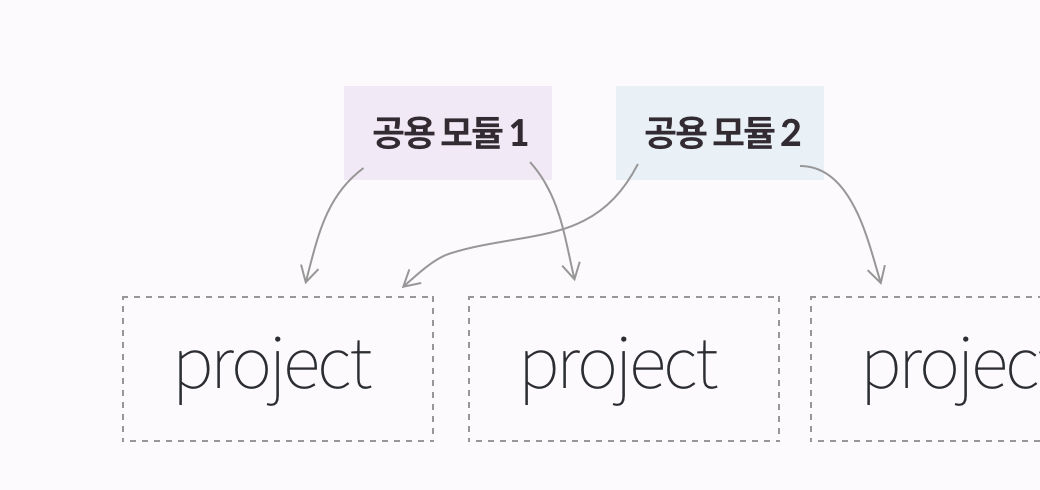
부모 프로젝트에서 자식프로젝트의 validation class를 사용해 볼 것이다.
1. 부모 프로젝트 셋팅하기 submodule_parent라는 이름의 react+TS 프로젝트를 셋팅한다. ```bash npx
create-react-app submodule_parent —scripts-version=react-scripts-ts ```
App.tsx파일에서 form을 생성하여, input의 글자가 Email 형식이 아니라면 fail, Email 형식이면 pass 워딩을 보여주는 UI를 만들 것이다.
// App.tsx
import * as React from "react";

namespace App {
  export interface IState {
    isEmail: boolean;
    text: string;
  }
}

class App extends React.Component<{}, App.IState> {
  constructor(prop: React.Component) {
    super(prop);
    this.state = {
      isEmail: false,
      text: ""
    };
  }
  // validation check
  onCheckEmail = () =>
    false 👈👈
      ? this.setState({ isEmail: true })
      : this.setState({ isEmail: false });

  handleChange = (e: React.ChangeEvent<HTMLInputElement>) =>
    this.setState({ text: e.target.value });

  render() {
    return (
      <div className="App">
        <input type="text" onChange={this.handleChange} />
        <button onClick={this.onCheckEmail}>isEamil?</button>
        {this.state.isEmail ? (
          <h1 style={{ color: "green" }}>Pass</h1>
        ) : (
          <h1 style={{ color: "red" }}>Fail</h1>
        )}
      </div>
    );
  }
}

export default App;
email validation 로직은 공용 모듈로 분리해보자.
2. 자식 프로젝트 셋팅하기
부모 프로젝트에서 submodule로 추가하기 위해서는 자식 프로젝트를 remote repository에 올려야한다.
예시를 위해 submodule_child라는 이름을 사용했지만, 실제 프로젝트에 넣어질 이름으로 짓는게 좋다. ex. validation
mkdir submodule_child
cd submodule_child

# 자식 프로젝트
git remote add origin <repository 주소>
해당 폴더에 validation class를 만들었다. 현재 예시로 든 부모 프로젝트는 src 아래의 ts파일을 컴파일하도록 설정해놓았다. (src 밖의 ts파일은 컴파일하지 못함.) 만약 js파일로 공용 모듈을 만든다면 상관없지만, ts로 만든다면, src 하위에 submodule을 관리하는 폴더를 두도록 해야 한다. (혹은 경로에 상관없이 tsconfig파일에서 inlcude에 포함하면됨)
// validation.ts
export class Validation {
  email = (email: string): boolean => {
    const regexr =
      /^[0-9a-zA-Z]([-_\.]?[0-9a-zA-Z])*@[0-9a-zA-Z]([-_\.]?[0-9a-zA-Z])*\.[a-zA-Z]{2,3}$/;
    return regexr.test(email);
  };
  phone = (phone: string): boolean => {
    const regexr = /^\d{3}-\d{3,4}-\d{4}$/;
    return regexr.test(phone);
  };
}
공용으로 사용할 class을 만들었고, push 한다.
- 현재는 자식브랜치의 master 브랜치에서 작업 후 올렸지만, 부모프로젝트에서 자식프로젝트의 여러 브랜치에 접근할 수 있으므로, 전략적으로 사용해도 된다.
- 개인적으로는 꼬일 수 있기 때문에 공용모듈은 master만 받는 식으로..하는게 좋지 않을까..
git commit -am "first init"
git push origin master
3. 부모 프로젝트에 자식 프로젝트 submodule로 추가하기 부모 프로젝트의 경로로 가서 아래의 명령어로
submodule을 추가할 수 있다. - 추가시 따로 submodule을 관리하는 폴더가 있다면 해당 경로로 이동 후 add하면된다.
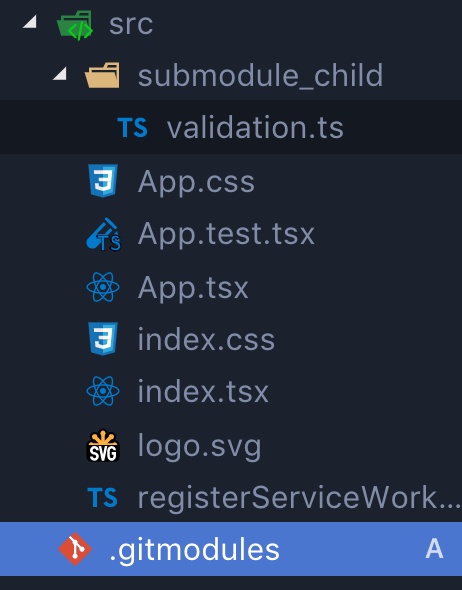
git submodule add <자식 프로젝트 repository>추가가 되면 자동으로 .gitmodules파일이 생성되고, 해당 경로에 submodule파일이 fetch된다.
- 예시의 경우 src 하위에 submodule_child라는 서브모듈을 추가하였다.
.gitmodules파일에는 프로젝트에서 관리하고 있는 서브모듈 목록에 대한 정보가 들어있다.- 이 파일도
.gitignore파일처럼 버전 관리된다. - 이 프로젝트를 Clone하는 사람은 .gitmodules 파일을 보고 어떤 서브모듈 프로젝트가 있는지 알 수 있다.
[submodule "src/submodule_child"]
path = src/submodule_child
url = git@github.com:feel5ny/submodule_child.git
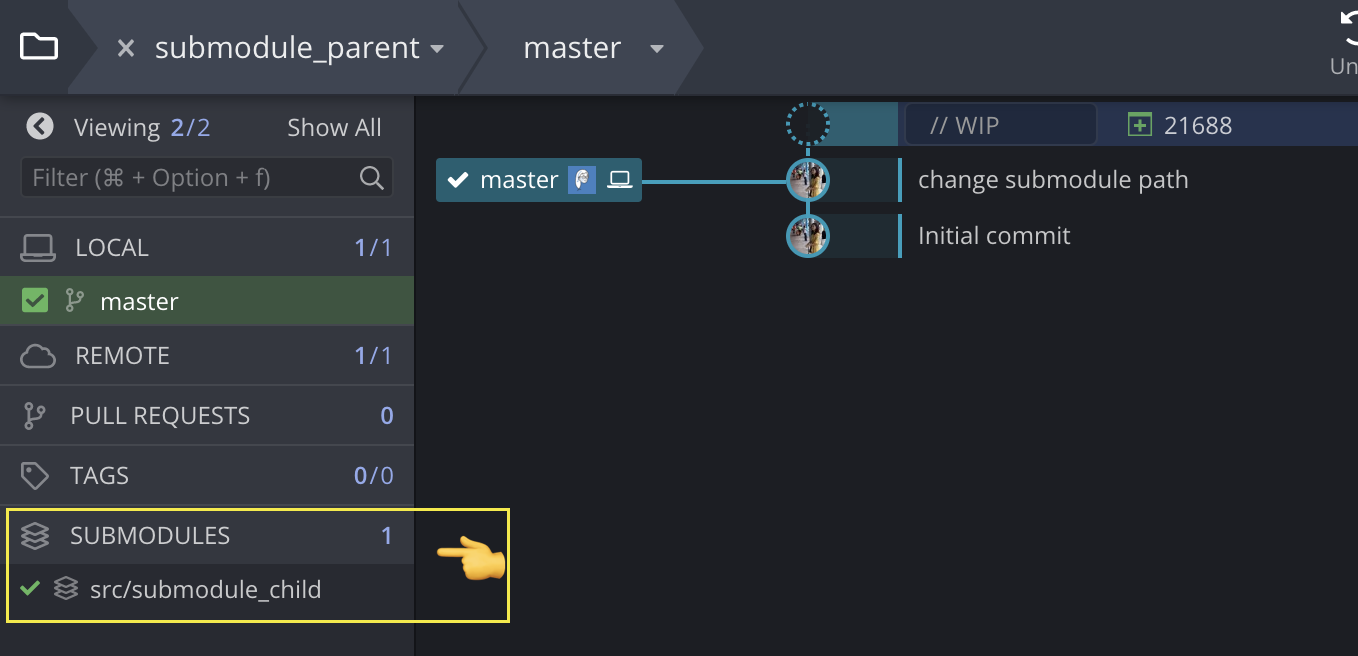
깃 크라켄이라는 git client app을 사용하고 있는데, 해당 옵션에도 추가된 것을 확인할 수 있다.
import * as React from "react";
import { Validation } from "./submodule_child/validation";
/********* 👆👆👆 *********/

namespace App {
  export interface IState {
    isEmail: boolean;
    text: string;
  }
}

class App extends React.Component<{}, App.IState> {
  validation: Validation;
  constructor(prop: React.Component) {
    super(prop);
    this.validation = new Validation();
    this.state = {
      isEmail: false,
      text: ""
    };
  }
  onCheckEmail = () =>
    this.validation.email(this.state.text) 👈👈
      ? this.setState({ isEmail: true })
      : this.setState({ isEmail: false });

  handleChange = (e: React.ChangeEvent<HTMLInputElement>) => this.setState({ text: e.target.value });
  render() {
    return (
      <div className="App">
        <input type="text" onChange={this.handleChange} />
        <button onClick={this.onCheckEmail}>isEamil?</button>
        {this.state.isEmail ? (
          <h1 style={{ color: "green" }}>Pass</h1>
        ) : (
          <h1 style={{ color: "red" }}>Fail</h1>
        )}
      </div>
    );
  }
}

export default App;
4. 자식 프로젝트 수정 후 부모 프로젝트에서 update하기 공용 컴포넌트는 자주 바뀔 일을 없겠지만,
한번 add 된 이후 update가 있을면 기존 프로젝트에서 pull하는 방식과 마찬가지로 update하면된다. 대신 pull을 이용해 최신 코드를 받길 원한다면 해당 경로로 이동하여 pull을 받아야 한다. - 공식 문서에는 서브 모듈사용 시 수정할 경우 (부모 프로젝트에서 자식 프로젝트 수정할 경우) 주의사항에 대해 자세히 작성되어있으니 읽어보길 권한다. 서브 모듈 사용할 때 주의할 점들